Online annotation tools have emerged as a powerful force in the digital age, transforming the way we collaborate, analyze data, and enhance our understanding of complex information. These tools provide a comprehensive suite of features that empower users to annotate, highlight, and comment on various digital content, including images, documents, videos, and more.
From streamlining collaboration in project teams to facilitating in-depth data analysis for research purposes, online annotation tools have proven to be an indispensable asset in a wide range of industries and domains.
Overview of Online Annotation Tools
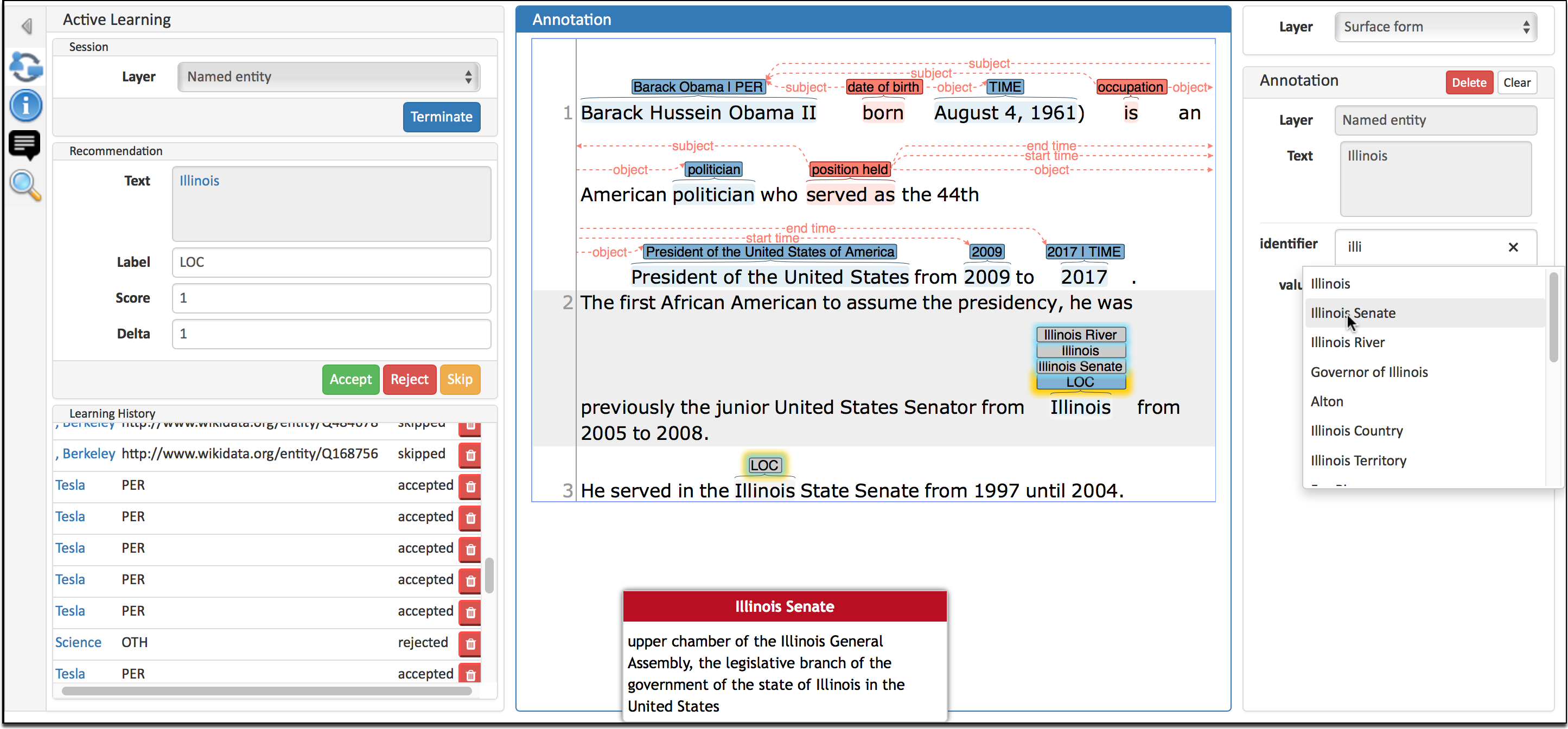
Online annotation tools are web-based applications that allow users to add notes, comments, and highlights to digital documents, images, and videos. These tools enable collaborative work and facilitate the sharing of insights and feedback among multiple users.
Online annotation tools offer several benefits, including:
- Improved communication and collaboration: Annotations allow users to share their thoughts and ideas with others in a clear and organized manner.
- Enhanced understanding: Annotations can help users better comprehend complex documents or visual content by providing additional context and explanations.
- Efficient feedback: Online annotation tools streamline the feedback process, allowing users to provide specific and targeted comments on shared content.
- Time-saving: Annotations eliminate the need for lengthy emails or phone calls, saving time and improving productivity.
Types of Online Annotation Tools
Online annotation tools provide a range of functionalities to annotate and collaborate on digital documents, images, and other multimedia content. These tools vary in their features and capabilities, catering to different annotation needs.
When working on strategic planning, online annotation tools can be a great help. They allow you to collaborate with others on documents, leaving comments and suggestions directly in the text. This can help to streamline the planning process and ensure that everyone is on the same page.
Strategic planning tools can help you to develop a comprehensive plan that will guide your organization to success. They can help you to identify your goals, develop strategies to achieve them, and track your progress. Once you have a plan in place, you can use an online annotation tool to track your progress and make any necessary adjustments.
The main types of online annotation tools include:
Text Annotation Tools
- Text Highlighting:Allows users to highlight sections of text in different colors for emphasis or identification.
- Text Underlining:Similar to highlighting, underlining text adds a line below the selected text for emphasis.
- Text Strikethrough:Crosses out selected text to indicate deletion or irrelevance.
- Text Commenting:Enables users to add comments or notes directly on the text, providing explanations or feedback.
Image Annotation Tools
- Drawing and Shape Tools:Allow users to draw lines, arrows, shapes, and other annotations directly on images.
- Text Annotation on Images:Similar to text annotation tools, but specifically designed for annotating images.
- Image Cropping and Resizing:Enable users to crop or resize images to focus on specific areas or adjust the size.
Audio and Video Annotation Tools, Online annotation tool
- Time-stamped Comments:Allow users to add comments or annotations at specific time points in audio or video recordings.
- Transcript Annotation:Enable users to annotate transcripts of audio or video content, highlighting or commenting on key points.
Collaborative Annotation Tools
- Shared Annotation Spaces:Allow multiple users to annotate the same document or multimedia content simultaneously.
- Annotation History and Tracking:Track changes and annotations made by different users, providing a record of the annotation process.
- Real-time Collaboration:Enable users to see each other’s annotations and collaborate in real-time.
Key Features of Effective Online Annotation Tools
Effective online annotation tools are characterized by a range of features that enhance the annotation process. These features empower users to annotate with precision, collaborate efficiently, and gain insights from their annotations.
Collaborative Annotation
- Real-time collaboration:Allows multiple users to annotate the same document simultaneously, enabling seamless teamwork and real-time discussions.
- Shared annotations:Ensures all annotations are visible to collaborators, fostering shared understanding and avoiding confusion.
- Comment threads:Facilitates discussions and clarifications by allowing users to leave comments and replies on annotations.
Precision Annotation
- Highlighting and underlining:Provides basic annotation functionality for emphasizing important sections of text.
- Text notes:Allows users to add text annotations directly on the document, providing context and explanations.
- Drawing tools:Enables users to draw shapes, arrows, and other visual annotations to highlight key points or connections.
Insights and Organization
- Tagging:Assigns s or labels to annotations, facilitating easy categorization and organization for later retrieval.
- Search and filtering:Allows users to search and filter annotations based on tags, s, or other criteria, enabling efficient information retrieval.
- Annotation summaries:Provides a concise overview of all annotations in a document, helping users quickly grasp the key points.
Benefits of Using Online Annotation Tools
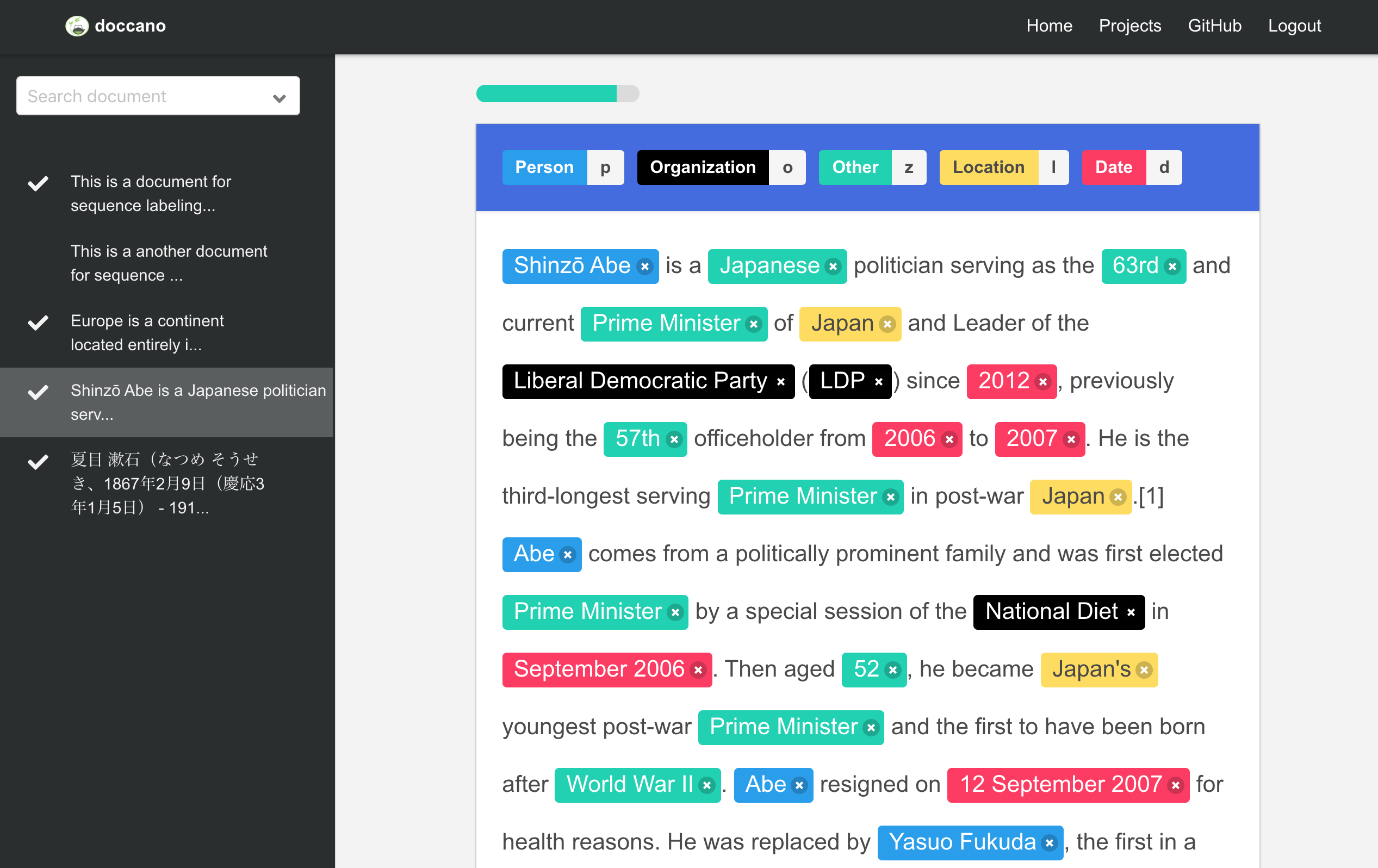
Online annotation tools offer numerous advantages for various purposes, enhancing collaboration and data analysis processes. Let’s explore their benefits:
Streamlined Collaboration:
- Facilitate real-time collaboration among team members, regardless of location or time zones.
- Enable simultaneous editing, commenting, and discussions on shared documents, eliminating the need for multiple versions or emails.
- Provide a central platform for project management, task assignment, and progress tracking.
Improved Data Analysis:
- Allow for efficient annotation, tagging, and categorization of large datasets.
- Enable easy filtering, searching, and sorting of annotated data, facilitating pattern identification and insights.
li>Support data visualization and analysis, providing visual representations of annotated data for deeper understanding.
Challenges and Limitations of Online Annotation Tools

Despite their numerous benefits, online annotation tools also come with certain challenges and limitations. Understanding these constraints is crucial for effective tool selection and utilization.
Annotating documents online is a breeze with the plethora of tools available. If you’re dealing with device discovery on Ubiquiti, there’s a specialized tool for that too. Just head over to device discovery tool ubiquiti to get started. Once you’ve got your device up and running, you can seamlessly return to your online annotation tool and continue working on your documents.
One potential challenge is compatibility issues. Different annotation tools may not be compatible with all file formats or operating systems, which can limit their accessibility and usability. Additionally, security concernsarise when sensitive data is annotated and shared online. Ensuring the privacy and confidentiality of annotated information is essential.
Collaboration and Accessibility
- Limited real-time collaboration: Some tools may not support simultaneous editing or annotations, which can hinder collaborative work.
- Accessibility limitations: Individuals with disabilities may encounter challenges accessing or using certain annotation tools due to lack of accessibility features.
Tool Features and Functionality
- Limited annotation capabilities: Not all tools offer a comprehensive range of annotation features, which may restrict the depth and scope of annotations.
- Complexity and learning curve: Some tools may require significant training or technical expertise to use effectively, which can be a barrier to adoption.
Data Management and Security
- Data storage and security concerns: Online annotation tools store annotated data on remote servers, raising concerns about data privacy and security.
- Version control and data loss: Managing multiple versions of annotated documents and preventing data loss can be challenging in some tools.
Use Cases for Online Annotation Tools
Online annotation tools are versatile tools that find applications across various industries and domains. They empower users to collaborate effectively, enhance workflows, and improve outcomes.
Education
- Collaborative learning: Students can annotate shared documents, discuss ideas, and provide feedback to their peers.
- Peer review: Teachers can use annotation tools to facilitate peer review processes, allowing students to provide constructive criticism and improve their writing.
Business
- Document review: Teams can annotate and comment on documents, track changes, and make collaborative decisions.
- Project management: Annotation tools help teams track project progress, assign tasks, and provide feedback.
Research and Development
- Data analysis: Researchers can annotate data sets, identify patterns, and draw insights.
- Code review: Software developers can use annotation tools to review code, identify bugs, and suggest improvements.
Healthcare
- Medical imaging: Doctors can annotate medical images to identify and diagnose diseases.
- Patient records: Healthcare professionals can use annotation tools to add notes, track patient progress, and share information with colleagues.
Design and Creative
- Image editing: Designers can annotate images to provide feedback, suggest revisions, and collaborate with clients.
- User experience testing: UX designers can use annotation tools to gather feedback on website or app designs.
Future Trends in Online Annotation Tools
The future of online annotation tools is bright, with emerging trends and advancements promising to enhance the user experience and expand the capabilities of these tools.
One significant trend is the integration of artificial intelligence (AI) and machine learning (ML) into online annotation tools. AI-powered tools can automate repetitive tasks, such as object recognition and text summarization, freeing up users to focus on more complex tasks.
Enhanced Collaboration and Communication
Future online annotation tools will prioritize collaboration and communication among users. Features such as real-time annotation sharing, version control, and user-generated feedback will enable teams to work together seamlessly and efficiently.
Cross-Platform Compatibility and Accessibility
As technology continues to evolve, online annotation tools will become more cross-platform compatible, allowing users to access and use them from various devices and operating systems. This will increase accessibility and convenience for users.
Data Security and Privacy
With the increasing emphasis on data privacy and security, future online annotation tools will prioritize protecting user data. Advanced encryption techniques and robust security measures will be implemented to ensure the confidentiality and integrity of annotated data.
FAQ Resource
What are the benefits of using online annotation tools?
Online annotation tools offer numerous benefits, including improved collaboration, enhanced data analysis, streamlined content review, and increased team productivity.
What types of online annotation tools are available?
There are various types of online annotation tools, each designed for specific purposes. Some common types include image annotation tools, text annotation tools, video annotation tools, and collaborative annotation tools.
What are the key features of effective online annotation tools?
Effective online annotation tools typically offer features such as annotation creation and editing, collaboration tools, customizable views, and integrations with other software.
What are some use cases for online annotation tools?
Online annotation tools find applications in various domains, including software development, education, healthcare, research, and content creation.
